
Records and finance
One set of trips. Two sets of records.
Trips are logged automatically in a logbook that meets ATO requirements. Nothing is keyed in and no paper logbook is kept: the plug records the journey, your geofence rules sort it and you only classify the trips that need it. Every correction keeps its reason and its author, so the record holds up if its ever questioned.
Trip log
Track all your vehicle trips automatically and add descriptions where needed, so every record is accurate. History goes back 24 months.
Only fix the exceptions
Tabs for Needs review, Recent and All history, with totals for records, total distance and business distance. Each trip shows the time, vehicle, route from zone to zone, distance and type and flags when a description is needed.Bulk classification, with an audit trail
Select the trips that belong together, set them to Business or Private, add a correction reason and a shared business purpose and it saves as one audited correction.Recalculate trips
Change your zones and past trips can be reclassified against the current geofences, so a late zone does not leave a year of trips wrong.Filter to the question you have
By date, vehicle, route, purpose or rego.Compliance records
Tabs for Exceptions, ATO logbook, Fuel tax and All exports and you can export any period. The Australian Tax Office logbook is the record the tax office needs to back up business use of a vehicle.
A logbook that meets ATO requirements
Business use per vehicle, worked out from trips that were recorded as they happened rather than reconstructed at the end of a quarter and exported as CSV. Trip purpose comes from your geofence rules, or a quick classification for any trip that needs one.Exceptions, before they pile up
Business trips still needing a description, with an Add description link on each, plus suggested places to check that feed straight into zone setup.Fleet business use
Business kilometres against private, across the fleet, as a single percentage. The same records support fringe benefits tax, where the business-use split is what your accountant needs.Fuel tax credits, off public road
Classified routes are reconciled with confirmed fuel purchases and approved date-specific rates. No claim is inferred from trip summaries alone. Light vehicles on public roads generally do not attract fuel tax credits, so this workflow is about off-road use.M.A.T.E. Track provides records, not tax advice. Talk to your accountant.
Accountant view
Your accountant gets their own login, at no extra cost and sees only the records that concern them. No broad access to the fleet and no more chasing you for a spreadsheet.
- Accountant view LiveUsers are unlimited, so adding your accountant costs nothing.
- Read-only, by designData and exports, nothing else. They cannot change a vehicle, a trip or a setting.
- What they can extractThe ATO logbook, fuel tax credit records, fringe benefits tax data and expenses with receipts attached. Voided records stay out of the totals.
- Several businesses, one personAccount switching keeps each fleet's records separate for whoever manages more than one.
M.A.T.E. Track provides records, not tax advice. Eligibility is assessed by your business and your adviser.
Expenses
Every receipt in one place, ready for the accountant. Photograph it and M.A.T.E. reads the details off it, so nobody retypes anything.
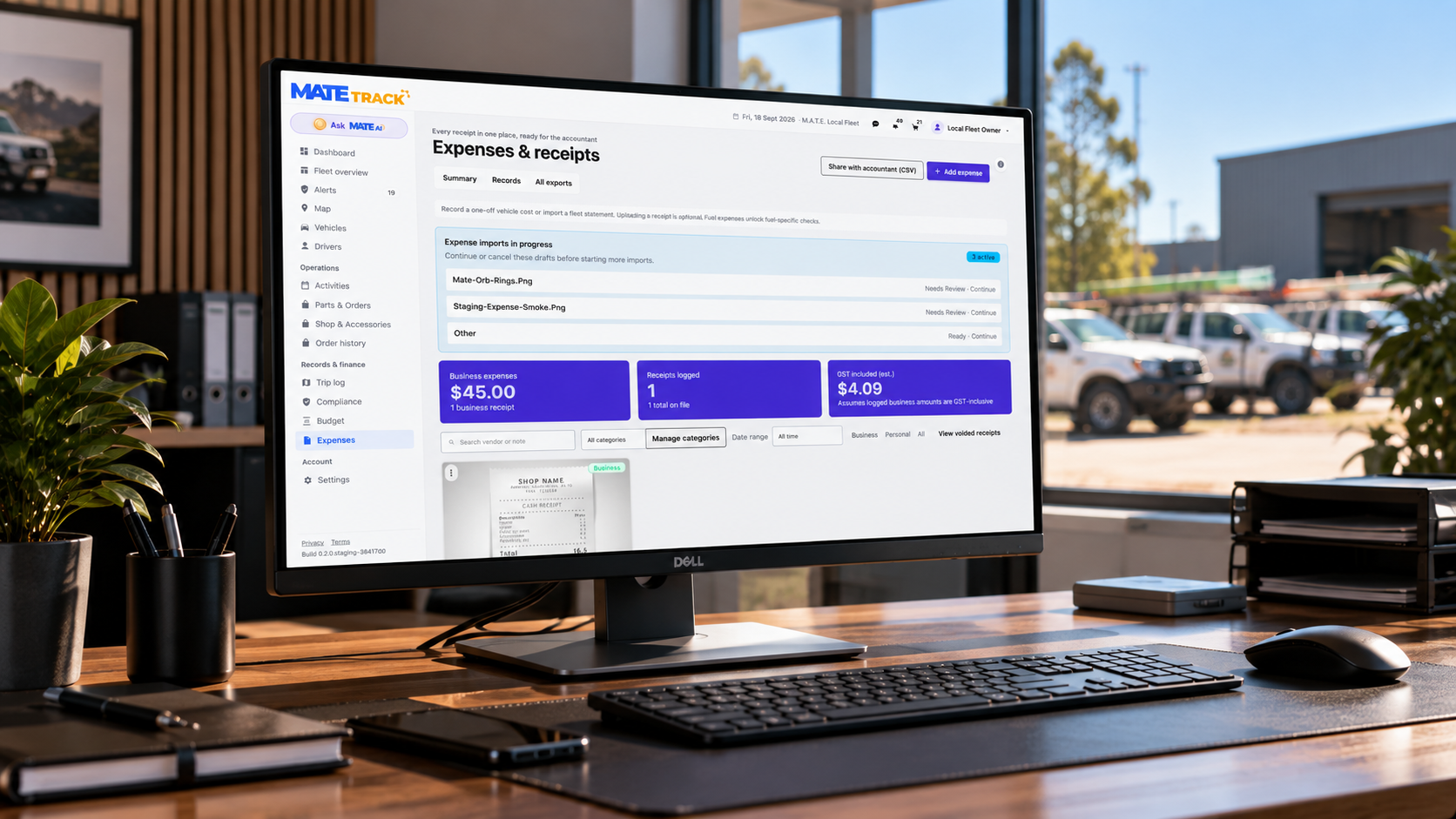
- Add one or import a statementAdd an expense or import a fleet statement. Imports wait as drafts to review or continue and receipts are optional.
- It lands on the right vehicleEach receipt carries the vendor, amount, category, vehicle, date, a note and who uploaded it. Fuel expenses unlock fuel-specific checks.
- Sorted how you need itSearch, filter by category and date, manage your own categories, split Business, Personal or All and view voided receipts.
- Share with accountantA clean CSV export. Summary totals cover business expenses, receipts logged and GST included (estimated).
Budget and forecast
What the fleet will cost, before it happens. Enter your fuel price and planning assumptions and the forecast projects running costs forward. A handy comparison to see how your cashflow will look a year from now.
- A daily fleet analysis in plain EnglishM.A.T.E. reviews the account each day and reports what it finds: a vehicle using more fuel than expected for its distance, vehicles with no trips in 90 days, a vehicle with plenty of trips but no fuel recorded. Each finding says what to check.
- Transparent and itemisedScope and summary on one tab, your assumptions on another, so a forecast can be argued with rather than taken on faith.
- Quick actionsRecord an expense or plan a vehicle service without leaving the page.
- M.A.T.E. never changes your plansThese are suggestions to action. M.A.T.E. never changes your budget, dates or plans on its own.
It suggests. You decide.
Hand your accountant a clean file.
We will walk through your reporting, your zones and your exports with you.